T3 Code
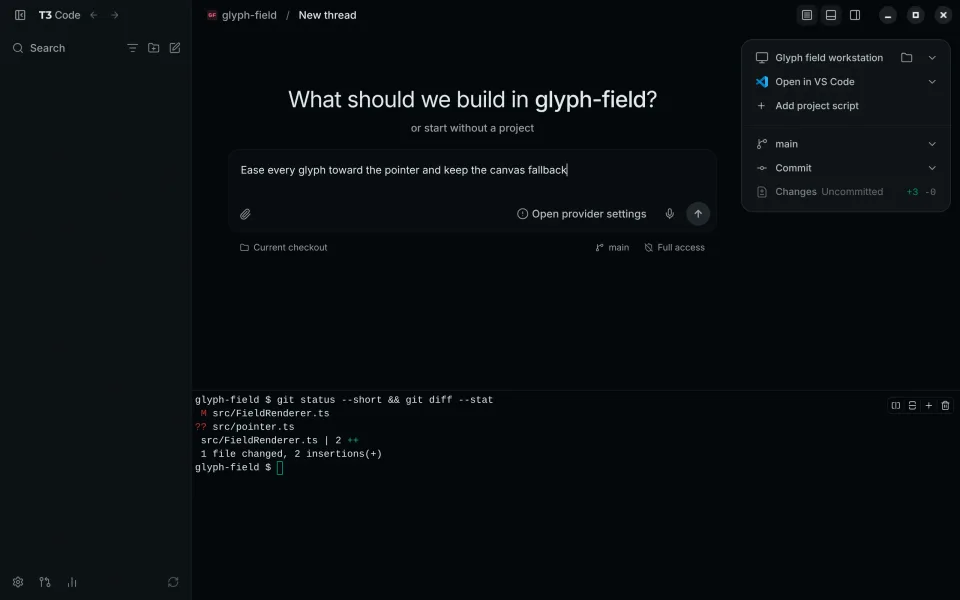
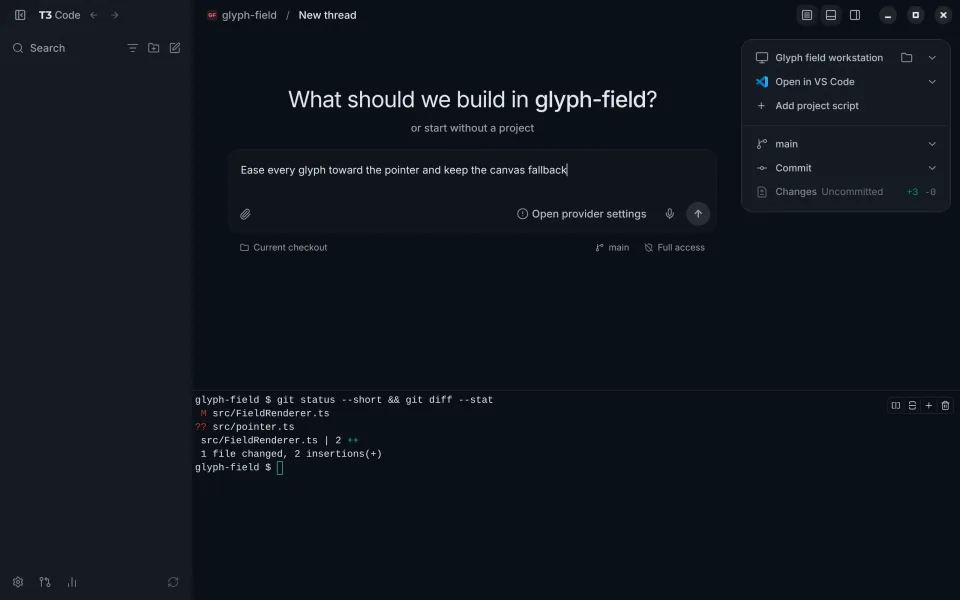
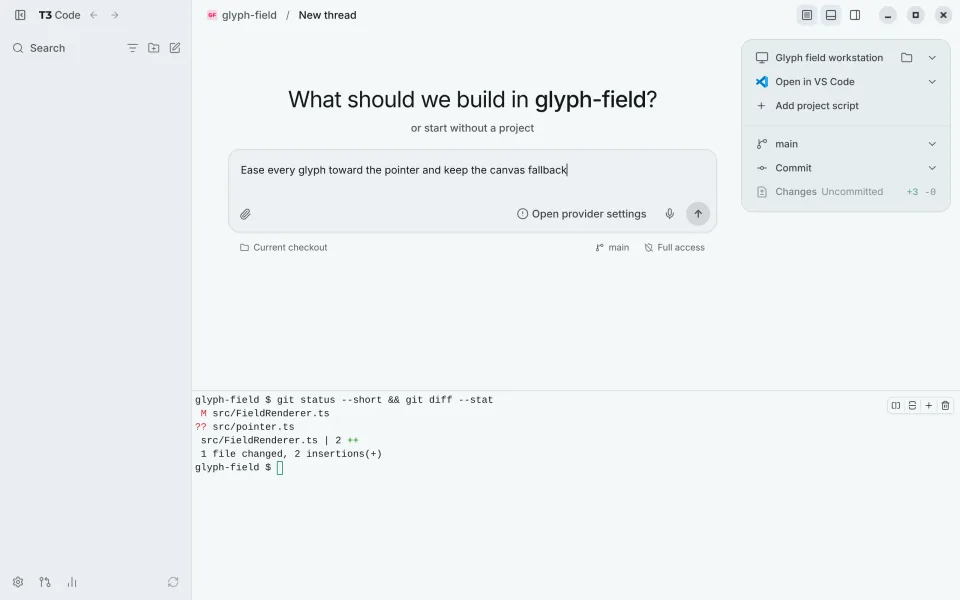
Living Code theme for T3 Code: native environment themes for the chrome, sidebar, composer, status surfaces and integrated terminal.
- Get it
- Download a native environment theme JSON
- Group
- AI & Agents
- App
- t3.codes
- Problem?
- Report an issue
- Flavors
Install
Download the flavor you want directly into T3 Code's environment theme directory:
flavor=night # night, frost, paper, or signal
themes="${T3CODE_HOME:-$HOME/.t3}/userdata/themes"
curl -fsSL --create-dirs -o "$themes/living-code-$flavor.json" "https://raw.githubusercontent.com/living-code-theme/t3code/main/themes/living-code-$flavor.json"Then make it the environment theme with T3 Code's own CLI; open desktop and web clients switch to it live:
t3 theme set "living-code-$flavor"Alternatively, open Settings → Theme and pick the Living Code card. A theme only replaces its own appearance half, so Paper fills the light slot and Night, Frost or Signal the dark slot. t3 theme show lists the published themes, and t3 theme clear removes the environment default.
No settings file is replaced and no restart is needed: the server watches the themes directory. The example is for Linux/macOS shells; on Windows, place the JSON in %USERPROFILE%\.t3\userdata\themes (or %T3CODE_HOME%\userdata\themes) and run the same t3 theme set command. For a remote environment, install the file on the machine running the T3 Code server.
Download the flavor you want directly into T3 Code's environment theme directory:
flavor=frost # night, frost, paper, or signal
themes="${T3CODE_HOME:-$HOME/.t3}/userdata/themes"
curl -fsSL --create-dirs -o "$themes/living-code-$flavor.json" "https://raw.githubusercontent.com/living-code-theme/t3code/main/themes/living-code-$flavor.json"Then make it the environment theme with T3 Code's own CLI; open desktop and web clients switch to it live:
t3 theme set "living-code-$flavor"Alternatively, open Settings → Theme and pick the Living Code card. A theme only replaces its own appearance half, so Paper fills the light slot and Night, Frost or Signal the dark slot. t3 theme show lists the published themes, and t3 theme clear removes the environment default.
No settings file is replaced and no restart is needed: the server watches the themes directory. The example is for Linux/macOS shells; on Windows, place the JSON in %USERPROFILE%\.t3\userdata\themes (or %T3CODE_HOME%\userdata\themes) and run the same t3 theme set command. For a remote environment, install the file on the machine running the T3 Code server.
Download the flavor you want directly into T3 Code's environment theme directory:
flavor=paper # night, frost, paper, or signal
themes="${T3CODE_HOME:-$HOME/.t3}/userdata/themes"
curl -fsSL --create-dirs -o "$themes/living-code-$flavor.json" "https://raw.githubusercontent.com/living-code-theme/t3code/main/themes/living-code-$flavor.json"Then make it the environment theme with T3 Code's own CLI; open desktop and web clients switch to it live:
t3 theme set "living-code-$flavor"Alternatively, open Settings → Theme and pick the Living Code card. A theme only replaces its own appearance half, so Paper fills the light slot and Night, Frost or Signal the dark slot. t3 theme show lists the published themes, and t3 theme clear removes the environment default.
No settings file is replaced and no restart is needed: the server watches the themes directory. The example is for Linux/macOS shells; on Windows, place the JSON in %USERPROFILE%\.t3\userdata\themes (or %T3CODE_HOME%\userdata\themes) and run the same t3 theme set command. For a remote environment, install the file on the machine running the T3 Code server.
Download the flavor you want directly into T3 Code's environment theme directory:
flavor=signal # night, frost, paper, or signal
themes="${T3CODE_HOME:-$HOME/.t3}/userdata/themes"
curl -fsSL --create-dirs -o "$themes/living-code-$flavor.json" "https://raw.githubusercontent.com/living-code-theme/t3code/main/themes/living-code-$flavor.json"Then make it the environment theme with T3 Code's own CLI; open desktop and web clients switch to it live:
t3 theme set "living-code-$flavor"Alternatively, open Settings → Theme and pick the Living Code card. A theme only replaces its own appearance half, so Paper fills the light slot and Night, Frost or Signal the dark slot. t3 theme show lists the published themes, and t3 theme clear removes the environment default.
No settings file is replaced and no restart is needed: the server watches the themes directory. The example is for Linux/macOS shells; on Windows, place the JSON in %USERPROFILE%\.t3\userdata\themes (or %T3CODE_HOME%\userdata\themes) and run the same t3 theme set command. For a remote environment, install the file on the machine running the T3 Code server.
Details
Configuration
The JSON is T3 Code's native environment theme format (version, name, appearance, colors). It sets all 61 color roles explicitly: canvas, chrome and toolbar use the slate ground; sidebar, surfaces and code blocks use the alternate surface; hovers, popovers and user message bubbles use the highlight ramp; borders, inputs and selections step up through the border and selection tones. The accent drives focus rings, the send button, the terminal cursor and update badges. Error, warning and search highlights use the palette's flare, amber and match roles over faintly tinted surfaces. Signal intentionally keeps status colors neutral/teal instead of introducing extra hues. Every foreground role is checked for at least 4.5:1 contrast on its surface.
Colors come from a revision-pinned Living Code core palette and are written as plain hex, never derived at runtime from a canvas/accent seed. That matters: T3 Code fills any missing role from its pink T3 Chat palette, so a partial theme would leak foreign colors.
For automatic light/dark switching, choose System appearance and assign Paper to the light half and a dark flavor to the dark half in Settings → Theme. A theme you save or duplicate in the in-app editor wins over a published file with the same id; delete that copy to use the downloaded one. T3 Code ignores symlinked theme files but accepts a symlinked directory, so with NixOS/Home Manager link the whole .t3/userdata/themes directory rather than individual JSON files.
Compatibility
Verified with T3 Code 0.1.8 (desktop, Linux): the files are published and activated with t3 theme set, and the captures check that the renderer applies the selected palette. The format and the 61-role vocabulary are checked against the release's pinned source (packages/shared/src/themePalettes.ts and packages/contracts/src/server.ts at tag v0.1.8). The JSON is platform-independent and also styles the browser client of the same environment; captures run the nixpkgs build of that tag on Linux/X11 with locked Mesa software rendering.
The theme covers T3 Code's interface and the integrated terminal's background, foreground, cursor, selection and scrollbar. T3 Code 0.1.8 does not expose the terminal's 16 ANSI colors or the syntax-highlighting theme of code blocks and diffs to environment themes, so those keep the app's defaults. Agents running inside the terminal that emit their own truecolor values need their own Living Code port (for example Claude Code or Codex).